
Qualifier Plus IIIx
Calculated IndustriesBusiness
4.883.00 Reviews
- Version
- 10.4.11
- Installs
- 10.00K
- Age Rating
- Everyone
Screenshots
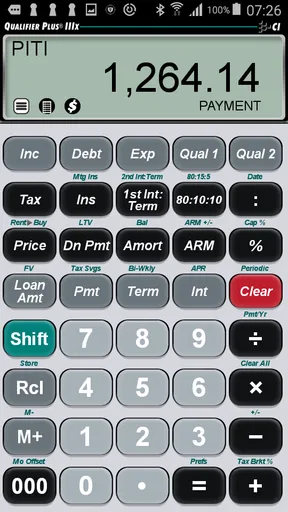
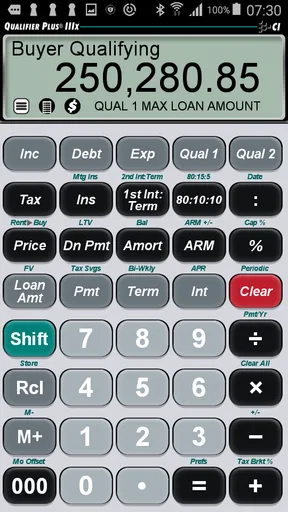
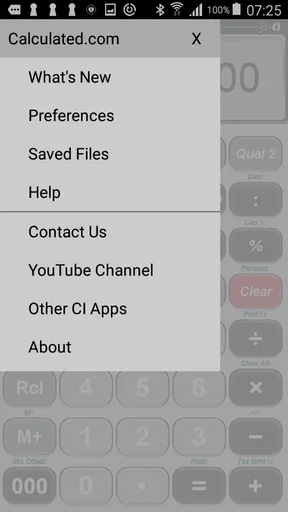
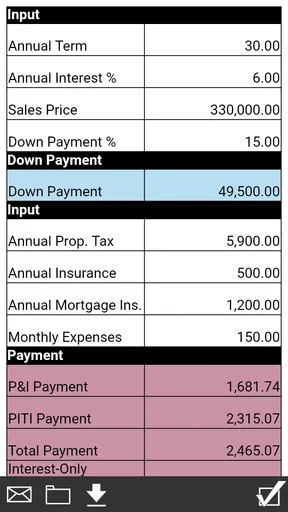
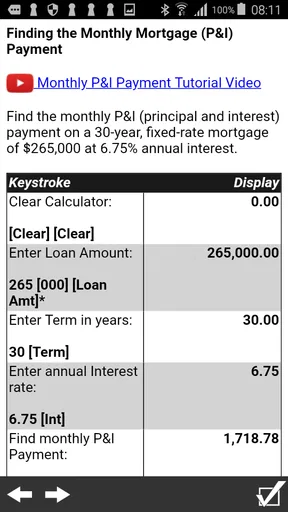
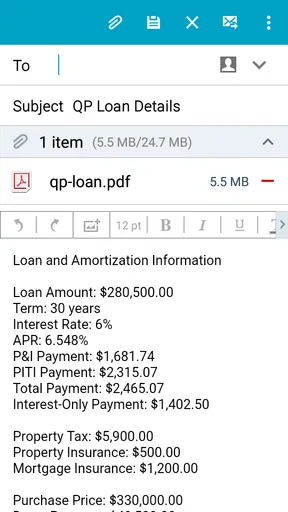
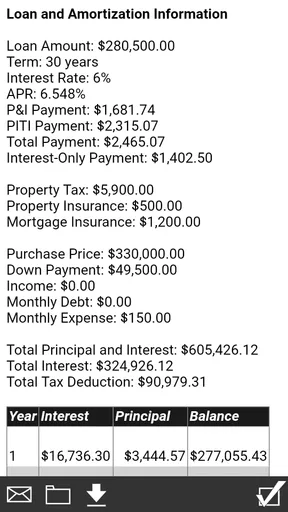
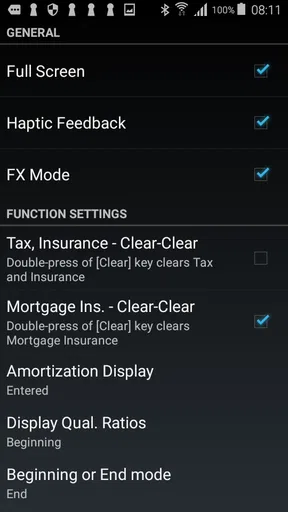
Our Review of Qualifier Plus IIIx
 Analysis by Appyee
I tested Qualifier Plus IIIx as a focused mortgage payment calculator rather than as a general finance app. That distinction matters. It is built for a narrow job: helping you work through home-loan figures when you want a dedicated tool instead of a spreadsheet or a broad personal-finance application. In my experience, that focus makes it useful during quick property comparisons, but it also means you need to know exactly what kind of help you expect before installing it.
Developed by Calculated Industries, this free Business app has earned a 4.8 average from over 300 ratings and has passed 10 thousand installs. Those figures suggest that it has found a clear audience among people who need mortgage calculations on a phone. It is rated for Everyone, runs on Android 6.0 and later, and the current version is 10.4.11. I would not treat those details as a substitute for trying the workflow yourself, but they do make the app approachable for a wide range of users.
How the calculator fits into real mortgage decisions
The first thing I noticed is that this is not the sort of app I would open for casual budgeting. Its purpose is more specific: turning mortgage assumptions into payment figures that can help you compare possibilities. That makes it especially relevant when you are looking at several homes, checking whether a quoted payment seems reasonable, or trying to understand how a change in the loan terms affects the result.
A realistic example is a weekend property search. You might have a target purchase price, a rough down payment, and a lender’s estimated interest rate. Instead of writing each scenario on paper, you can enter one set of assumptions, note the result, then adjust the figures for a different home or a larger down payment. The practical benefit is not that the app makes the decision for you. It gives you a quicker way to test the decision’s financial shape.
I also found the dedicated format more useful than a basic calculator for this kind of task. A normal calculator can multiply and divide, but it does not naturally organize a mortgage question. A spreadsheet offers more flexibility, yet it takes longer to build and is easier to break with a misplaced formula. A general banking app may show an estimate, but it usually reflects that institution’s preferred flow. This calculator sits between those options: more purposeful than a generic calculator, but less expansive than a complete financial-planning system.
That middle position is its main identity. You are not installing a full home-buying adviser, a loan marketplace, or a household budget manager. You are installing a tool for running mortgage-related calculations with less setup than a spreadsheet. I think that is a sensible approach for users who already understand the basic terms they are entering and simply want faster scenario checking.
What the free access means in practice
The app is free to install, which lowers the barrier for someone who wants to test its usefulness before committing money. That is important here because a mortgage calculator is only valuable if its input flow matches the way you think. You can find out whether the layout suits you without first paying an upfront purchase price.
There are in-app purchases ranging from $0.49 to $29.99 per item. I would therefore separate free access from overall value. The free entry point is useful for evaluating the calculator, but anyone considering paid items should check what each purchase unlocks at the moment of use and decide whether that extra value matters to their workflow. I would not assume that paying automatically makes the calculations more accurate; the quality of a result still depends on the assumptions entered and how well the result matches the loan being considered.
That distinction is particularly important for first-time buyers. A free tool can be helpful for learning how payment estimates respond to different figures, but it should not be confused with a lender’s formal quote. If you are comparing offers, I would use the app to prepare questions and test scenarios, then verify the final numbers with the lender or a qualified professional. The calculator can support a conversation without replacing the documents behind that conversation.
The age rating of Everyone is another small but useful advantage. It means the app is positioned as an accessible utility rather than a product aimed at a restricted audience. In practical terms, a household could use it together while discussing a purchase, with one person entering assumptions and another checking whether the result fits the family budget.
Where it delivers the most value
The strongest value comes from comparison, not from entering one number once and closing the app. Mortgage decisions involve several moving parts, and a dedicated calculator is most helpful when you use it to explore how those parts interact. I would try a conservative scenario, a likely scenario, and a more demanding scenario rather than relying on a single optimistic estimate.
One useful habit is to change only one assumption at a time. For example, keep the property figure steady while testing a different down payment, then reset that value and examine the effect of another interest rate. This makes the result easier to interpret. If you alter everything at once, you may get a new payment figure without understanding what caused the change.
A second practical use is checking affordability before contacting several lenders. You can form a rough range first, which helps prevent a conversation from being driven entirely by the maximum amount someone says you might qualify for. In my view, that is a better use of a calculator than treating its output as permission to stretch your budget.
A third use is preparing for a meeting. I would write down the assumptions behind each scenario, including which figures are estimates and which come from a lender or property listing. Then I would bring the questions raised by the comparison: why does one offer produce a different payment, which costs are included, and which figures could change later? The app is valuable here because it turns vague concern into specific questions.
There is also a less obvious benefit for people who already use spreadsheets. A spreadsheet is excellent when you need a long-term record, custom formulas, or a side-by-side table that you can share. But building a mortgage model from scratch can introduce errors, especially when you are working quickly on a phone. A purpose-built calculator can serve as a second check against your spreadsheet. If the two disagree, that is a reason to inspect the assumptions rather than immediately trusting either result.
Important limits behind any result
The biggest limitation is not necessarily the interface; it is the difference between a calculated payment and the full cost of owning a home. A mortgage figure may not represent every expense that affects your monthly budget. Property-related costs, insurance, taxes, maintenance, fees, and changes in lending terms can all matter. I would use the result as one component of a broader affordability check, not as the final monthly number.
This is where some users may expect more than the app’s focused purpose can provide. If you want a complete household budget, debt payoff plan, investment overview, or long-term net-worth picture, a mortgage calculator alone will feel narrow. A spreadsheet or a broader finance app would be better for combining housing costs with income, childcare, transport, savings, and existing debts.
Another trade-off is that the app depends on the quality of your inputs. A neat-looking result can still be misleading if the interest rate is only a guess, the loan term is wrong, or the purchase assumptions do not match the lender’s offer. I recommend labeling every figure as either confirmed, estimated, or deliberately stress-tested. That simple habit makes the output more useful and reduces the risk of treating an estimate as a promise.
I would also avoid using one scenario to compare lenders unless the assumptions are genuinely identical. Even a small change in the rate, term, financed amount, or included cost can make one result look better than another. The right workflow is to copy the same assumptions into each comparison, record the outputs, and then ask what the lender’s quote includes. The calculator supports consistency, but it cannot enforce it for you.
Users should also think about what they need from the result after the calculation is complete. If you want a saved history of every property considered, a printable report, or a shared planning document, a spreadsheet may be more convenient. If you only need quick calculations while viewing listings or speaking with a lender, the dedicated app is likely less cumbersome.
Small workflow choices that improve the experience
My first tip is to create a repeatable order for entering scenarios. Start with the property or loan amount, then the down payment, then the rate and term, and finally any other figure the calculation asks for. Following the same order each time makes it easier to spot a mistaken entry when two scenarios produce an unexpectedly similar result.
My second tip is to test a small change rather than making a dramatic one. A modest adjustment to the down payment or rate can show whether the payment is highly sensitive to that assumption. This is more informative than testing only an unrealistically low and high case. You are trying to understand the shape of the decision, not win an argument with the calculator.
My third tip is to keep a written note beside the result. Record the date of the lender’s quote or property listing, the assumptions used, and whether the figure is intended as a cautious estimate or a best-case illustration. The app can help you calculate, but your notes provide the context needed when you revisit the decision later.
My fourth tip is to use the tool before emotional commitment takes over. Once you have fallen in love with a property, it is easy to adjust assumptions until the payment appears acceptable. Running the same scenarios before viewing homes, and then repeating them after a promising property appears, gives you a more stable reference point. That is a behavioral advantage rather than a technical feature, but it is one of the most useful ways to use a calculator like this.
Who should use it and who should choose something else
I think Qualifier Plus IIIx is a good fit for first-time buyers who want a focused way to explore mortgage payments, homeowners comparing possible moves, and professionals who need quick figures during property-related conversations. It can also suit students or family members learning how loan assumptions influence payments, provided they understand that an estimate is not a lending decision.
It is particularly worthwhile for someone who dislikes spreadsheets but wants more structure than a standard calculator. The free installation makes it reasonable to try, and the dedicated purpose means you do not have to build a model before testing a few realistic scenarios. If the input flow feels natural and the results answer your immediate questions, the app can become a handy companion during early research.
I would be more cautious about recommending it as the only tool for a complicated purchase. Buyers with multiple properties, unusual financing arrangements, irregular income, substantial existing debt, or a need to model many costs at once may get more value from a spreadsheet or professional advice. Likewise, someone looking for account tracking, bill reminders, credit monitoring, or investment planning should skip this app and choose a broader financial product.
The same applies to users who want a formal, lender-specific answer. A dedicated lender calculator may be better when you are checking an offer tied to that institution’s exact terms. The advantage is closer alignment with the lender’s process; the disadvantage is that it may be less neutral for comparing different options. This app is more useful as an independent scenario tool, while the lender’s own figures remain important for confirmation.
My value judgment after using it
For me, the app’s value rests on focus and accessibility. It gives mortgage calculations their own workspace, avoids the setup burden of a spreadsheet, and can be tried without an upfront price. The presence of optional purchases means I would inspect the purchase screen carefully before paying, but the free starting point makes that evaluation manageable.
I would not recommend buying any optional item simply because a mortgage decision feels important. The sensible question is whether the specific paid value saves meaningful time or adds a capability you will actually use. For a one-time estimate, free access may be enough. For repeated property comparisons, a paid option could be worthwhile if it fits your workflow, but that is a personal value judgment rather than something I would assume for every user.
The 4.8 average and the app’s audience size give me confidence that many users find the basic idea useful, but they do not remove the need for careful checking. Mortgage calculations are sensitive to assumptions, and no mobile tool can turn uncertain inputs into certain financial outcomes. I appreciate the app most when I treat it as a disciplined way to ask “what if?” rather than as an authority that tells me what I can afford.
My final recommendation is straightforward: try it if you want a dedicated, free starting point for mortgage payment comparisons and you are comfortable verifying the details elsewhere. Use consistent assumptions, test more than one scenario, and keep the result alongside the lender’s documentation. Skip it if you need a complete financial plan, a detailed record-keeping system, or advice tailored to a complicated loan. Its best role is a practical mortgage-checking companion, not a replacement for careful financial judgment.
Verdict
Strengths of Qualifier Plus IIIx
- Supports advanced scientific calculations and complex equations.
- Includes statistics, regression, and probability functions for data analysis.
- Programmable functions help automate repeated calculations.
- Multi-line display makes long expressions easier to review.
- Useful for students in mathematics, science, and engineering courses.
Limitations of Qualifier Plus IIIx
- The interface may feel dated compared with newer calculator apps.
- Advanced features can take time to learn without the manual.
- Some functions require careful menu navigation and key combinations.
- Not ideal for users who only need basic arithmetic calculations.
- Availability and features may vary between Android and iOS versions.
Other Releases by Calculated Industries
View All
Construction Master 5 Calc
Tools4.7

Construction Master Pro Calc
Tools4.7

Pipe Trades Pro Calculator
Tools4.8

Real Estate Master IIIx Calc
Business4.7
Similar Picks in This Category
View All
LinkedIn: Community & Network
LinkedIn3.8

Zoom Workplace
zoom.com4.1

Microsoft Teams
Microsoft Corporation4.6

Meta Business Suite
Meta Platforms, Inc.4.6

Webex Meetings
Cisco Systems, Inc.4.5

TeamViewer Remote Control
TeamViewer4.4
Frequently Asked Questions
What is Qualifier Plus IIIx, and who is it designed for?
Qualifier Plus IIIx is a specialized financial calculator app designed for real estate, lending, mortgage, and property-investment calculations. It is intended for professionals, students, and users who need more than a standard calculator can provide, particularly when working with loan payments, interest rates, amortization, qualification figures, and property-related financial scenarios.
What calculations can I perform with Qualifier Plus IIIx?
The app focuses on mortgage and real estate finance calculations, including loan payments, loan amounts, interest rates, terms, future values, and amortization information. Depending on the version and supported functions, it may also help with qualification ratios, income and debt analysis, refinancing comparisons, and other lending scenarios. Users should review the in-app guide to confirm the exact available functions.
Is Qualifier Plus IIIx suitable for beginners?
Qualifier Plus IIIx can be useful for beginners, but it is primarily built around professional financial-calculator workflows rather than simple everyday arithmetic. New users may need time to understand its keys, financial notation, and calculation order. The app is easier to use after reading the instructions and practicing with small examples before relying on results for an actual loan or property decision.
Can I rely on Qualifier Plus IIIx for mortgage or financial decisions?
Qualifier Plus IIIx can be a valuable tool for estimating mortgage and real estate figures, but its results should not be treated as official approval, legal advice, or a guaranteed loan quote. Actual terms may vary because lenders use different policies, fees, taxes, insurance requirements, rounding methods, and qualification standards. Always verify important calculations with a lender or qualified financial professional.
Does Qualifier Plus IIIx work offline, and is it available for Android or iOS?
A financial calculator such as Qualifier Plus IIIx is generally intended to perform its core calculations without a continuous internet connection, which is convenient for meetings, classes, or property visits. However, availability, compatibility, pricing, and offline behavior can vary by platform and app release. Check the official Android or iOS store listing for current device requirements and supported operating systems before downloading.
